


Report Edsby problems
If you run into a problem using Edsby, there’s a new way you can let us know about it.
1. If using a web browser
Navigate to where you’re experiencing the unexpected behavior. Click the question mark icon in the top right corner of the page, and select “Report a problem on this screen.”

2. If using the Edsby app for iOS or Android
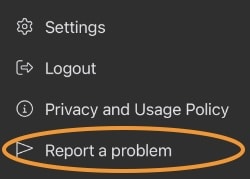
Under the three line “hamburger” menu in the top left corner of your Edsby mobile app home screen, select “Report a problem” and describe the issue you’re having and what you did to produce it.
Screenshots and diagnostic logs from your session will be captured and submitted to Edsby to aid in finding and fixing issues. Your report and your data will only be seen by Edsby personnel for the purpose of problem investigation and will not be used for follow up, support ticketing or other purposes, or shared with third parties.
