
Contact Sales

Digital forms and approvals for K‑12

Edsby Forms & Workflows: paper forms, approvals and signatures that run themselves.

Automate the most complex K‑12 workflows, even those that need audited parent or student sign-off, using the student records, contacts and permissions your district already has in Edsby.

A hand holding a pen over a page, overlaid with a faint grid of digits and charts

Most districts still run on paper, and pay for it in...

  1. Lost and incomplete forms

    Forms disappear into backpacks and come back unsigned, or never come back.

  2. Manual reconciliation

    Office staff reprint, chase and tally by hand.

  3. Compliance risks

    Paper trails and unmanaged signature apps leave gaps in the record.

  4. Fragmented systems

    Standalone tools sit outside student records and create data silos.

The Edsby difference

Standalone form builders start from zero. Edsby starts from your district’s own data.

Large K‑12 districts need more than basic data collection: multi-step approval chains, automated routing and stringent FERPA and GDPR compliance. Edsby leverages the data and security your district already has in the platform.

A standalone form builder

  • Contacts and permissions set up by hand
  • Student and roster data entered again
  • Security and governance added afterwards
  • Forms stranded in a disconnected database

Edsby Forms & Workflows

  • Responsibility framework: Edsby already knows who is responsible for which student, so permissions and contacts are inherited
  • SIS integration: records, rosters and parent contacts are already connected, with no duplicate data entry
  • Institutional security: role-based access and data governance are built in, not bolted on
  • Forms linked to student profiles, not kept in a separate database

Complex workflows like field trips

From the first proposal to the bus ride home

Digitize the complete lifecycle of a complex school activity like a field trip: the first teacher proposal, principal approval, parent permission and real-time student check-in to and from the destination.

  • Proposal, approvals and permissions in one workflow
  • Parents complete forms securely, even from mobile
  • QR codes act as virtual boarding passes for check-ins
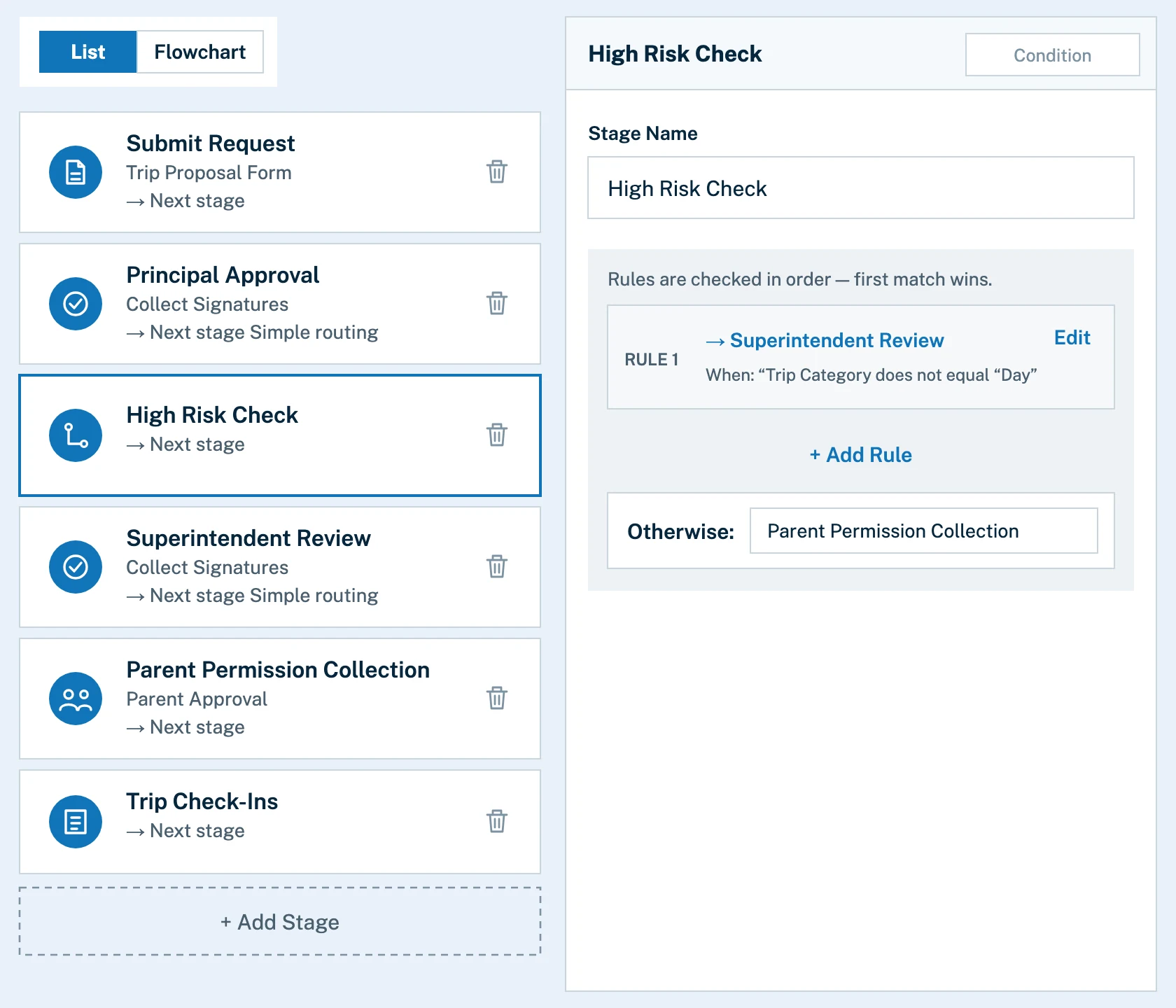
The Edsby workflow editor in list view: six stages for a school trip, from Submit Request through Principal Approval, a High Risk Check, Superintendent Review and Parent Permission Collection to Trip Check-Ins, with the High Risk Check rule routing trips that are not day trips to the superintendent

Tailored workflows

Route every form to the people who need to see it

Automate a form’s entire lifecycle from initial request to final distribution. Send forms to recipients under conditions you specify, and compose the steps as an ordered list or a flowchart.

  • Conditional branching
  • List or flowchart editing for complex flows
  • No limit on forms or workflow steps
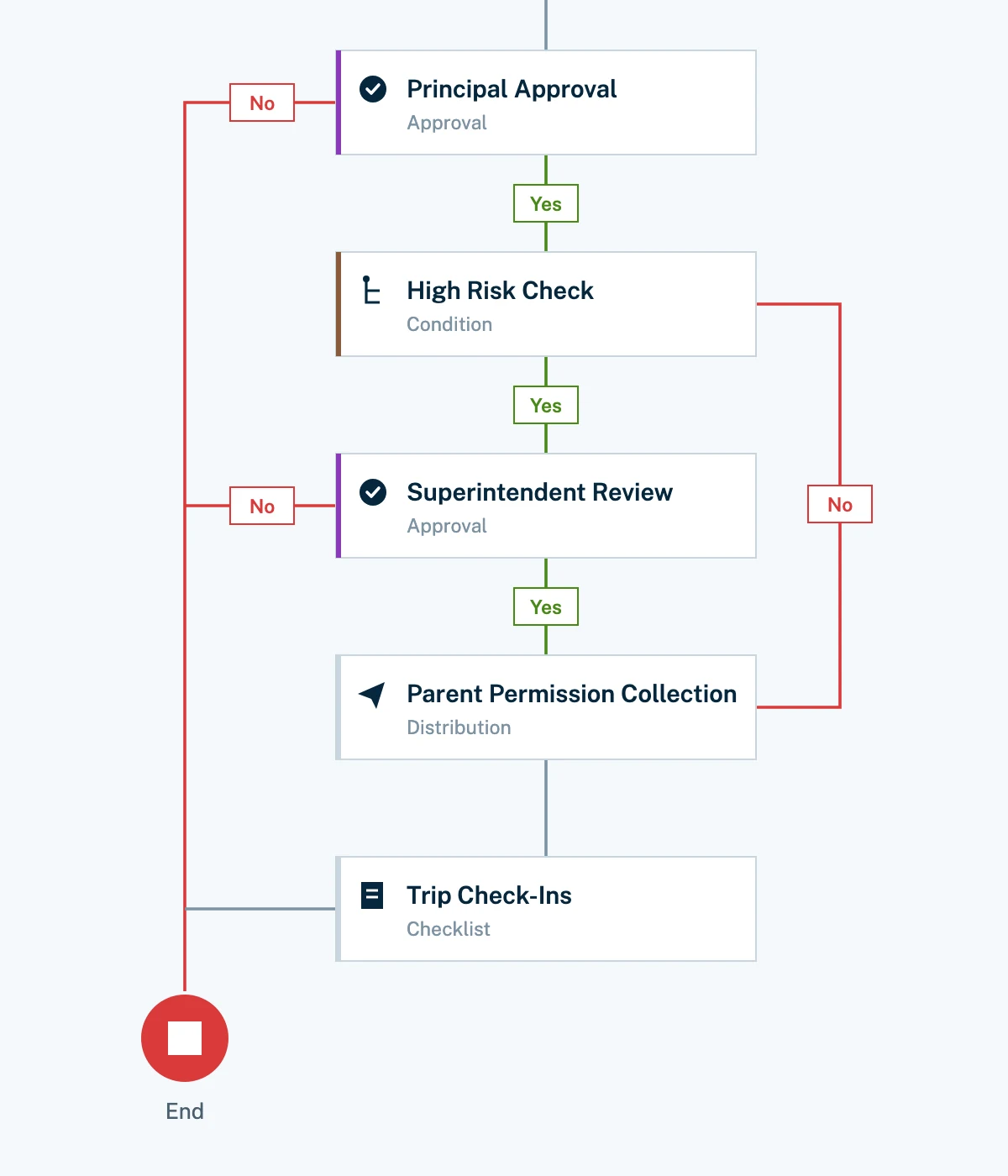
The same trip workflow as a flowchart: Principal Approval, High Risk Check, Superintendent Review, Parent Permission Collection and Trip Check-Ins, joined by green Yes paths, with red No paths leading to an End marker

Multi-level approval

Approvals that follow your organization chart

Forms can be created for students, guardians or staff. They can start at a school and still need district sign-off, like a high-risk field trip, and automatic routing sends each one to whoever needs to see or approve it.

  • Any user role can start or approve a form
  • District approvals, such as superintendent sign-off
  • Completion status at teacher, school and district level
A trip request’s timeline: Submit Request, Principal Review, High Risk Check, Superintendent Review and Parent Permission Collection all completed with who did them and when, and Board the Bus still to come

Full audit trail

A signature and a timestamp for every step

Every step is documented with digital signatures and timestamps, giving accountability and a log for every interaction. Administrators gain an auditable record of every approval.

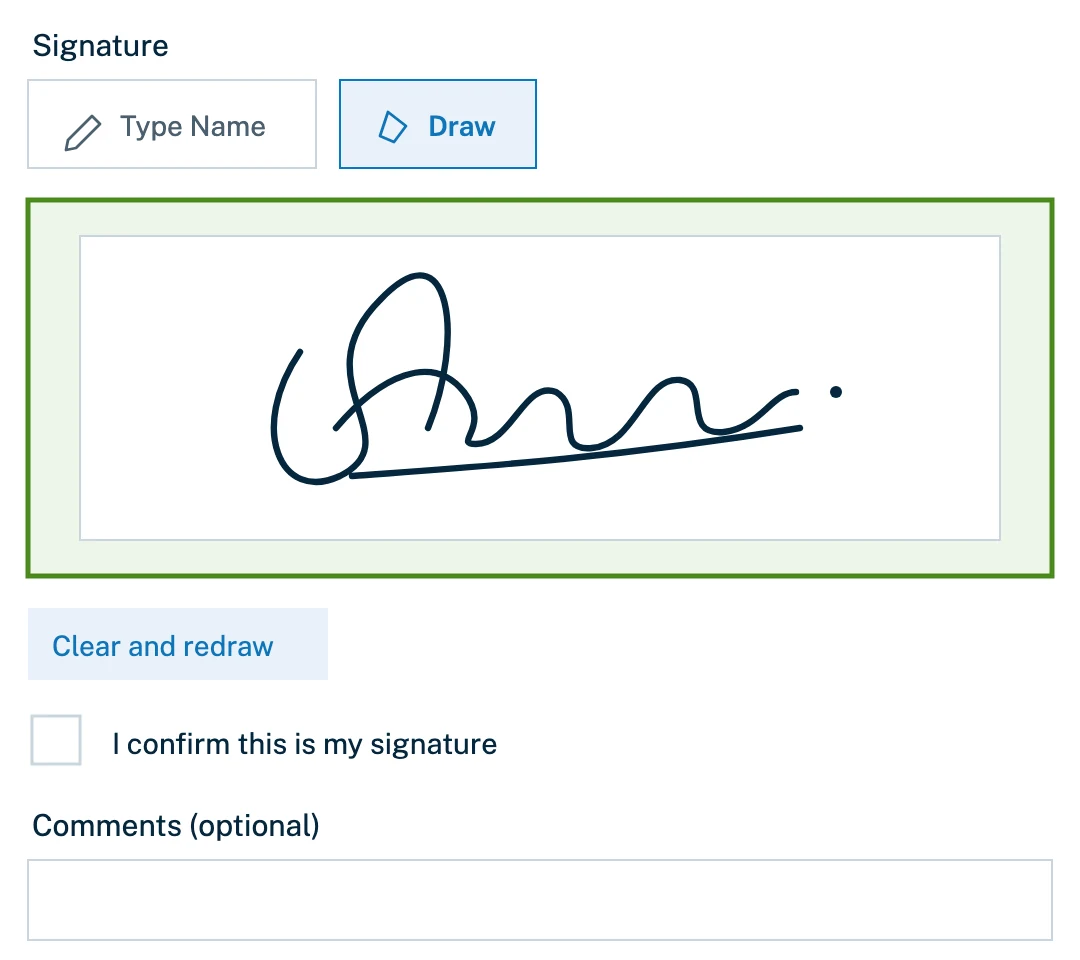
  • Draw a signature onscreen
  • Or type a name and attest it as the signature
  • Check-ins keep every student accounted for on trips
A signature field where the signer can type a name or draw it, showing a drawn signature, a Clear and redraw button, an I confirm this is my signature checkbox and a comments box

The forms engine

Build the form you actually need

From simple data collection to complex approvals, one forms engine covers it. Choose the fields, decide who can view each form and who can create or edit it, and route it between roles.

  • Text, number, date and time, dropdown, selection list and checkbox fields
  • File upload and signature fields
  • Permissions set for each form
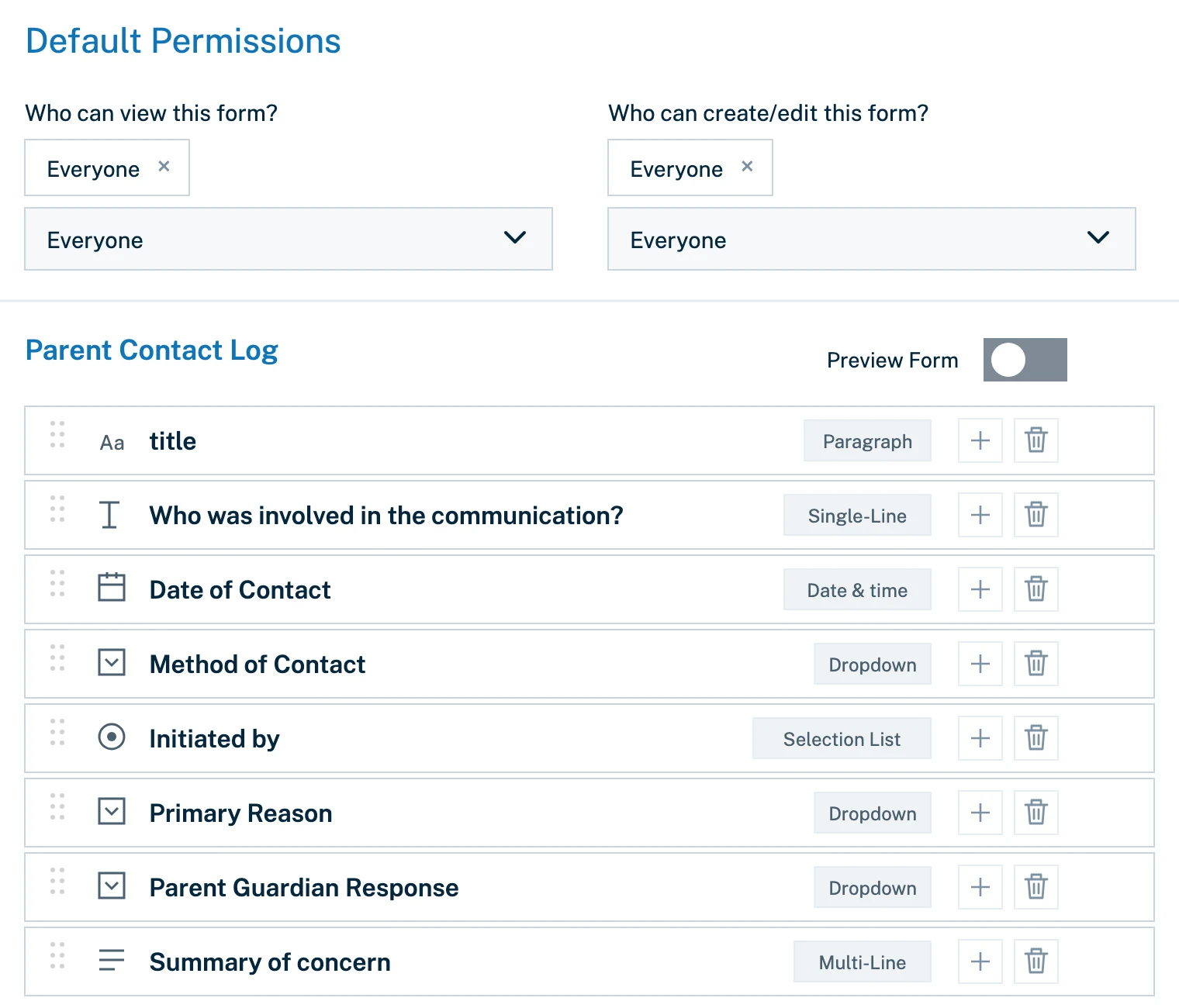
The form builder editing a Parent Contact Log: who can view and who can edit the form, and its list of fields, such as single-line text, date and time, dropdowns and a selection list

Inside the student record

Forms live where the student’s story does

Because forms are part of Edsby, staff can log something like a parent contact from the student’s own record, with the date, method and reason captured on the spot, and no second system to open.

  • Dropdowns and selection lists keep entries consistent
  • Sits beside the student’s contacts and details
  • One login for staff, students and families
A Parent Contact Log form open inside a student’s record, with a Method of Contact dropdown listing Edsby Message, Phone call, Email, In-person and Written note home

See it in action

From simple data collection to complex approvals

Edsby Forms & Workflows reduces cost, risk and complexity for K‑12 school districts. Watch how a form moves between roles.

A teacher with a tablet checks a boy as he boards a yellow school bus, a QR code on the bus beside them and a phone in the boy’s hand

From a district using it

What a district technology lead says

We’re excited to use Edsby Forms & Workflows this year to modernize field trip permissions, significantly reduce paperwork, and create a more streamlined experience for staff, students, and families.
Owen McIntoshInformation Technology Manager, Kawartha Pine Ridge District School Board, with 34,000 students on Edsby since 2014

FAQ

Questions about Edsby Forms & Workflows

Answers for district leaders, principals and office staff.

What is Edsby Forms & Workflows?

K‑12 runs on paper forms (permission slips, photo releases, medical disclosures, code of conduct sign-offs, volunteer agreements), and everyone from classroom teachers to front-office administrators pays for it in lost time, chased signatures and no reliable way to know what has been returned and what hasn’t.

Edsby replaces all of it with digital forms, approvals and legally valid signatures built specifically for K‑12. Unlike generic e-signature tools adapted from corporate workflows, Edsby Forms & Workflows is designed around how districts and schools actually operate, with routing and approval hierarchies that reflect real K‑12 organizational structures, and real-time visibility into completion status at the teacher, school and district level.

Even with complex workflows like field trips, there is no form that disappears into a backpack and no manual follow-up to track down stragglers. Administrators gain an auditable record of every approval. Teachers stop chasing parents. Office staff stop reprinting. And districts move off paper without adding complexity.

Who is it made for?

Edsby has been developed specifically for the needs of K‑12 school districts, regional governments and certain private independent schools. It is not developed for or marketed to higher education, corporate learning, individual public schools or home schools where other solutions are readily available.

Why are digital forms hard in K‑12?

Large K‑12 districts require more than basic data-collection tools; they need platforms that can handle complex, multi-step approval chains, automated routing, and stringent FERPA and GDPR compliance. Generic platforms often create “shadow IT” and data silos that complicate district-wide data management.

Edsby is built specifically for K‑12 environments, automating the entire lifecycle of school forms, from permission slips to multi-level administrative approvals. It integrates directly with student data, ensuring that forms are contextually linked to student profiles rather than existing in a disconnected database.

By choosing a purpose-built K‑12 platform, districts can eliminate the inefficiencies of manual, paper-based processes and achieve true digital transformation at scale.

Can Edsby process payments?

Payments are coming to Edsby Forms & Workflows soon, enabling registration and other workflows that require payment processing. Contact us to be notified when they’re available.

Are there digital signature platforms built specifically for K‑12 school forms?

Many consumer digital signature platforms exist. But they lack the institutional context required to manage the nuanced workflows of a school district. Edsby stands apart by providing a digital signature solution that is deeply integrated into the K‑12 ecosystem. It supports complex workflows, such as field trip authorization or medical clearance, that require not just a signature, but specific, automated approval chains.

By maintaining this process within a secure, auditable environment, districts eliminate paper bottlenecks and reduce the legal liability associated with unmanaged, disparate signature apps. This solution ensures that when a parent signs a form, it is immediately recognized by the system and triggers the necessary subsequent administrative or pedagogical actions.

A woman inviting you to contact Edsby

Let’s talk about Edsby Forms & Workflows

Talk with our team about digital forms and approvals for your district, region or school.