Contact Sales

Edsby for district leaders: Put insight into action, across every school.

All your administrative and academic data, and the tools to act on it, in the same system your educators and families already use.

A school leader smiles as colleagues listen during a meeting

What district leaders are accountable for

  1. Student achievement and equity

    Big-picture insight, and access for every student.

  2. Community support

    Families who are partners in every school.

  3. Building capacity

    Teachers who are supported, and who stay.

  4. Transparency

    Evidence when decisions are made or defended.

How Edsby helps district leaders deliver results

Student achievement and equity

Insights you can act on, in the system where the work happens

In K‑12, data lives in many systems that rarely talk to each other. Edsby consolidates it, shows where attendance, achievement and more are trending, and lets you act in the same system where teachers and students already work. It is integrated with Edsby, which you may already be using.

  • Data consolidation from disparate sources
  • Learner analytics, with data pushed to the right people
  • Monitor groups for the students you identify
  • A framework for distributing your own reports
Data-driven insights
Stylized view of an interactive Edsby attendance report: totals, the students most absent this week, absent rates over time, common incident reasons, and filters

Ensuring all students have access

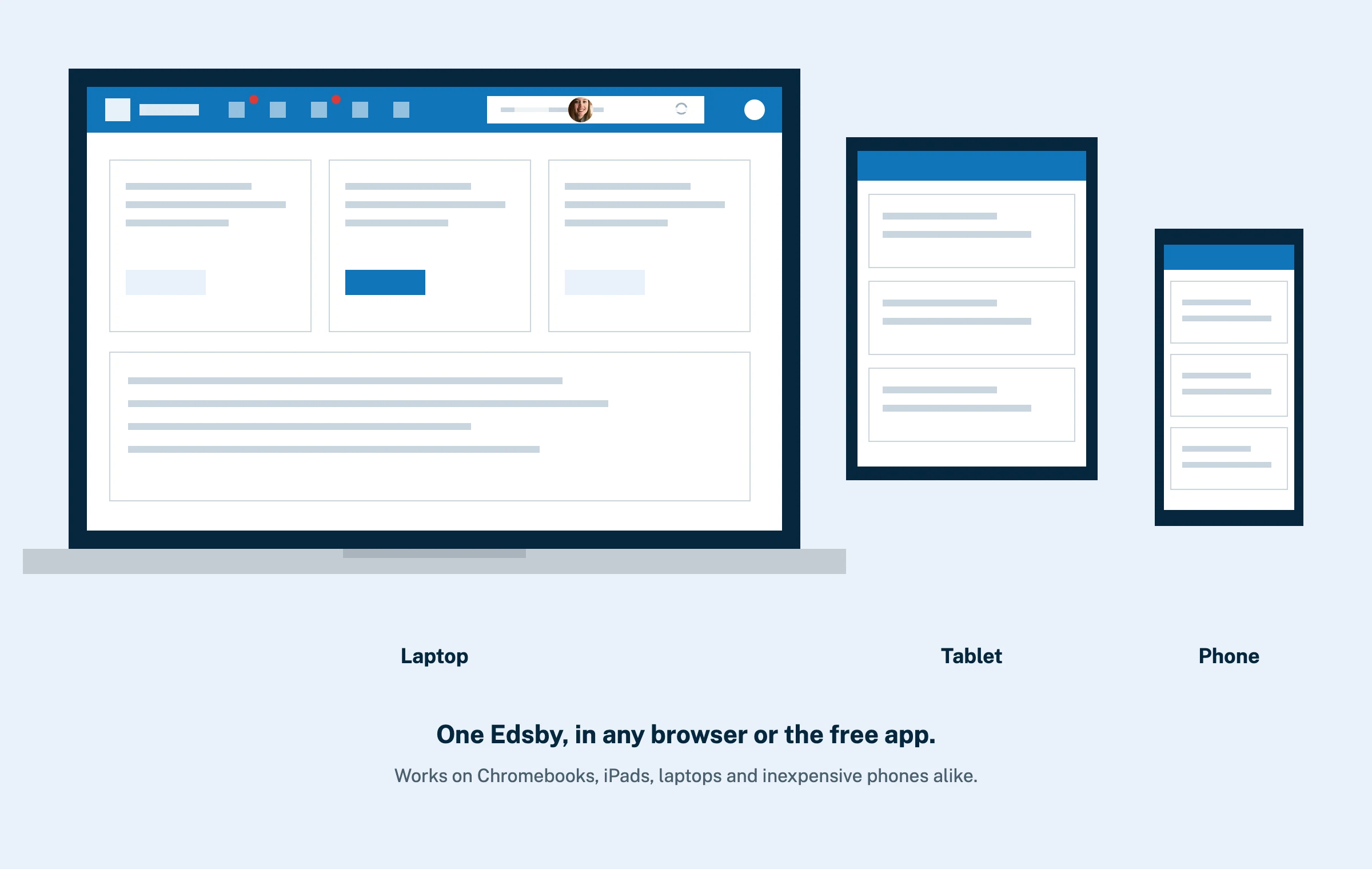
Every student, on any device

Equity starts with access. Edsby runs in any browser and in apps for iOS and Android, including on inexpensive phones, so every student and family can take part.

  • All computing platforms supported
  • Works on inexpensive phones
  • Support for any language, with translation
Smartphones and tablets
The same Edsby home screen on a laptop, a tablet and an inexpensive phone

Support of community

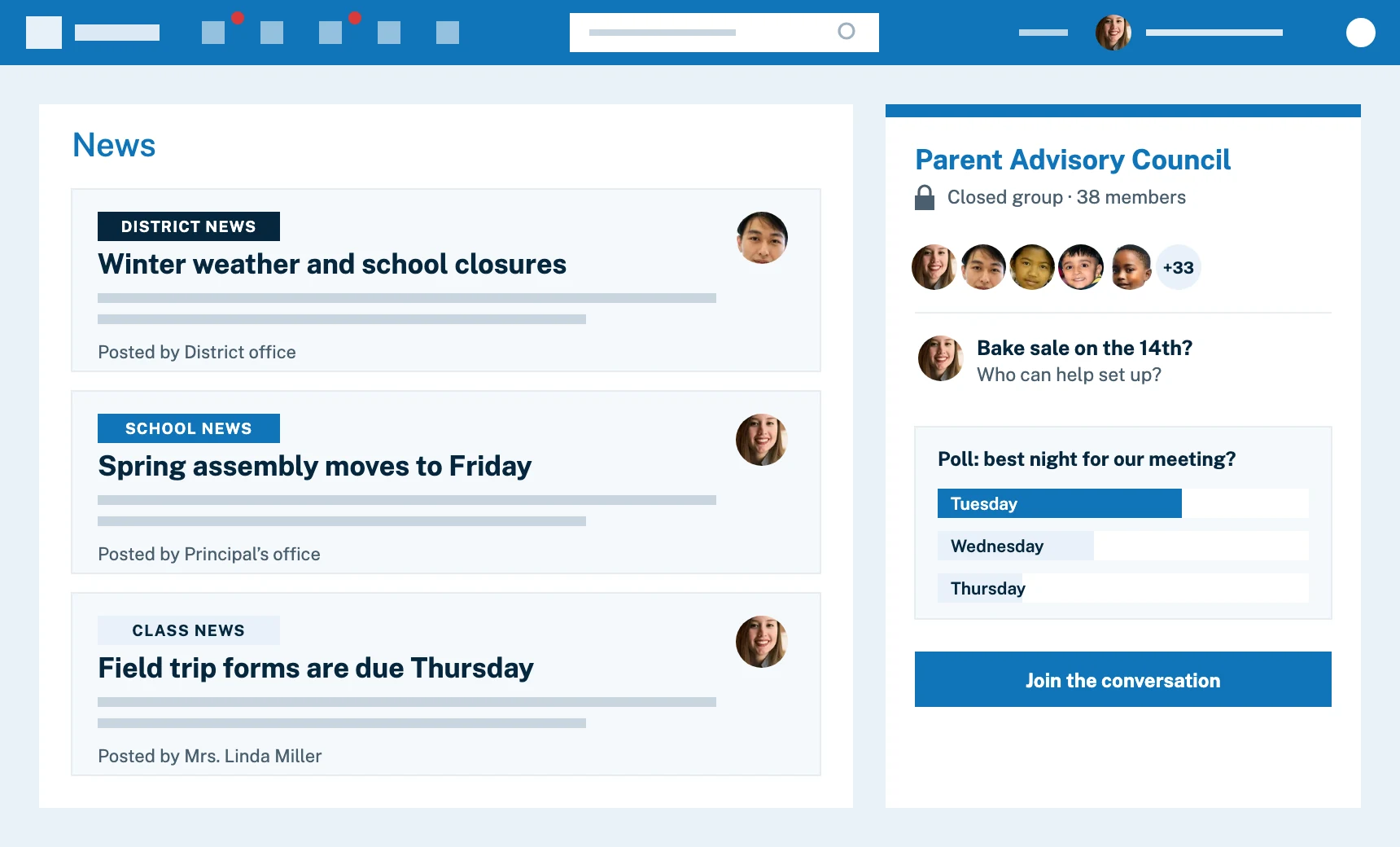
Parents as partners, in every school

Engaging families means navigating a range of expectations and answering criticism. Well thought-out access for parents gives them a better understanding of their child’s progress than ever, and turns them into partners. Parents are designed in from the start, not an afterthought, and teachers spend less time on back-and-forth.

  • Access to academic, attendance and other data, news and more
  • Two-way communication between school and home
  • Purpose-built workflows, such as parent-teacher interviews and approvals
  • Fewer apps, with the broadest single platform for K‑12
Improving family engagement
Stylized view of Edsby for a parent: district, school and class news from different senders, beside a closed Parent Advisory Council group with a poll

Building capacity

Help teachers thrive, and stay

Teacher recruitment and retention depend on support systems. Edsby fosters collaboration and professional development across the whole district, so best practice moves from classroom to classroom, and less time goes to parent back-and-forth.

  • PD and PLC groups, region-wide or across servers
  • Learning object repositories
  • Course modeling, including grade book setup
  • Perspective Analyze: enterprise-grade class analytics at no extra charge
Professional development groups
Diagram-style view of a shared Edsby Learning Object Repository whose approved materials are applied automatically to every teacher’s classes at the start of the year

Curriculum and assessment

Curriculum and assessment that fly in formation

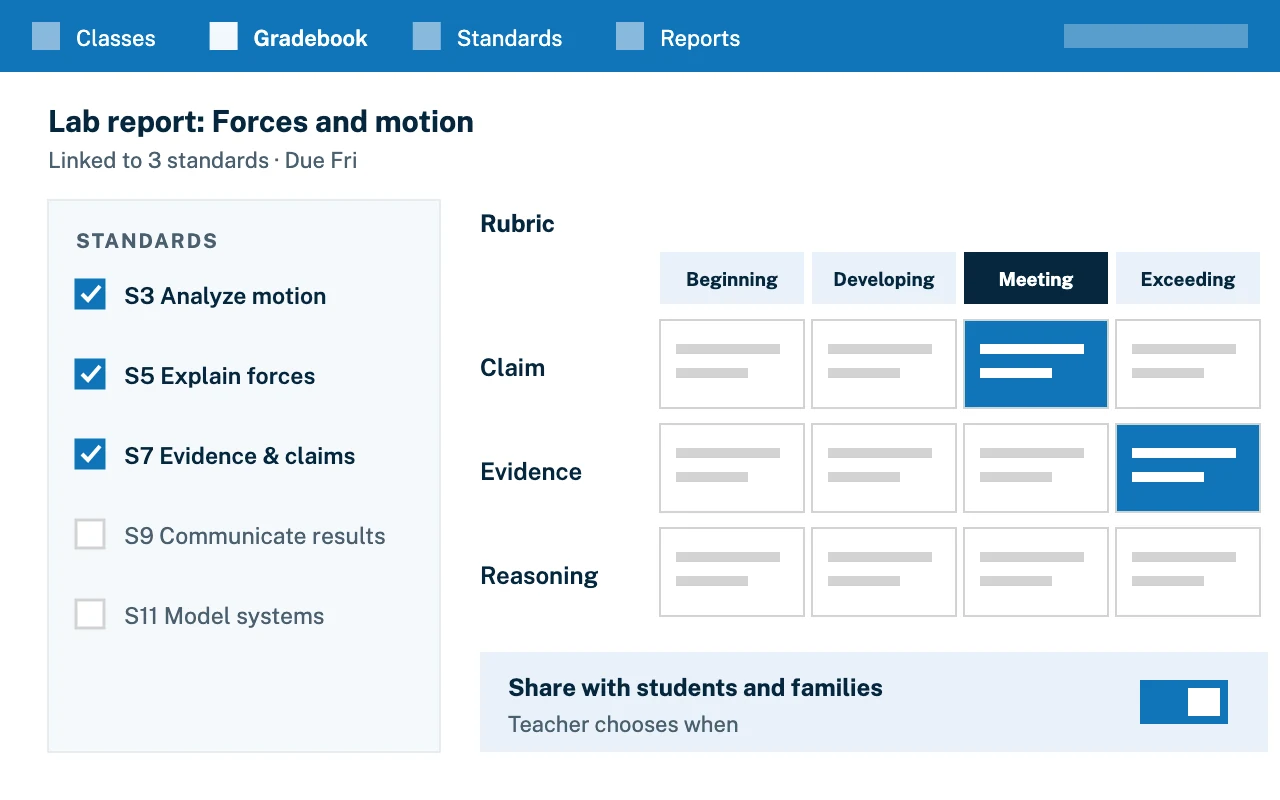
Make curriculum actionable. Enable every teacher to assess and report to the district's official assessment and reporting schemes by setting up their gradebooks for them. Schemes you do not sanction can be removed so no one uses them by accident.

  • Curriculum managed through CASE and Satchel
  • One grading and reporting policy, set once
  • Standards, expectations and competencies imported and kept current
  • Curriculum abstracts for students and families
Mockup of a gradebook assessment tied to standards, with a rubric scoring four levels

Show transparency

Evidence when decisions must be defended

When controversial decisions are made, you need a record. Edsby enables a single managed place for exchanges among students, parents and teachers, with an audit trail and wide-ranging role definitions. Forensics is easier in one system than across a set of point apps, and liability is lower.

  • Audit trail for messages, observations and changes
  • Groups with wide-ranging role definitions
  • Records easy to access if something goes wrong
Privacy and security
An audit trail: a searchable log of who sent a message, changed a grade or edited a record, with the date and time of each action

Why districts choose Edsby

See every school, and act.

Edsby gives district leaders the data collection and reporting they need, and the means to put policy changes into effect across the district and its stakeholders.

  • A real-time view of schools

    How many students and staff are absent at which schools, how many classes are being taught and what field trips are out, using Zooms.

  • Policy set once, applied everywhere

    Grading and reporting policies, including standards-based, so all educators assess and report the same way.

  • District-wide news

    Share news with the right communities. Articles publish only after an administrator with permissions approves them.

  • Collaboration at scale

    Create a sharing area for all science teachers, or all ECE teachers, in the district. Best assets can be copied into individual classes.

  • Parents engaged like never before

    Free, well thought-out access by design, so parents see assignments, tests, homework and absence data.

  • Modern, browser-based

    No additional software, and one interface from classroom to boardroom.

In their own words

What district leaders say

167School district testimonials

Edsby has so many great features that it’s hard to pick just one!
Andrew TaylorTeacher, Kawartha Pine Ridge District School Board, 38,000 students and their parents on Edsby since 2014
Having anecdotal evidence and the gradebook in one place is amazing!
Michael PearsonTeacher, York Region District School Board, 131,000 students, on Edsby since 2016
Edsby’s robust tools help teachers document learning and spark meaningful conversations with parents and students.
Tyler Hankinsone-Learning Head, Algoma District School Board, 9,400 students and their parents on Edsby since 2017
Parents already feel in the loop thanks to Edsby, so much so that conference night attendance has dropped!
Loraine ChristensenTechnology Support, C. Leon King High School
Edsby has made assessment, communication and reporting easier.
Stephen WilsonVice-Principal, B.A. Parker Public School
I replaced Google Classroom with Edsby for better tools and parent connection.
Scott SorestadTeacher, North East School Division
Love the 24/7 access and Microsoft 365 integration. Great for collaboration.
John HowittSuperintendent of Education and Information Technology, Greater Essex County District School Board, 38,000 students and their parents on Edsby since 2015
I love how Edsby’s fill and evidence tools simplify report cards.
Sarah YoungTeacher, Kawartha Pine Ridge District School Board, 38,000 students and their parents on Edsby since 2014
Edsby was simple enough for students to navigate during sudden distance learning.
Marc SmithTeacher, Durham Catholic District School Board, 22,000 students and their parents on Edsby since 2017
I’ve moved all my mastery quizzes to Edsby and will encourage my team to use shared assessments next year.
Jared ThorlaksonScience Department Head, Pembina Trails School Division, 18,000 students and their parents on Edsby since 2022
Great for messaging, communicating and easy attendance tracking.
Dianne GardnerAcademic Administrative Assistant, Great Lakes Christian High School
With Edsby, everything in one place for students, for staff, and for families.
Rita RussoDirector of Education and CEO, Kawartha Pine Ridge District School Board - 70,000 users on Edsby since 2014

FAQ

Questions district leaders ask about Edsby

About data, policy and rollout.

Visit the Help Center
Can we see what is happening across all our schools right now?

Yes. Zooms show absences, classes in session and field trips by school, with detail on any individual student. About the Schools zoom.

How do we find students at risk across the district?

Built in features help principals find students at risk in their schools. Monitor groups let school staff build plans for them.

Optional student analytics show how variables correlate, such as attendance and grades, across a district or whole region.

Can we set one grading and reporting policy for every school?

Yes. Policies, including standards-based grading and reporting, can be set in Edsby, and expectations, standards and competencies can be imported and managed. Standards-based grading and reporting.

Does Edsby work with our existing systems?

Yes. It connects to your SIS and other systems of record, and consolidates data from them.

Can teachers collaborate across schools?

Yes. Groups can span the district, so you can create a sharing area for every teacher of a subject. About professional development groups.

Is there a record we can rely on?

Edsby logs messaging between students, teachers and parents, observations, academic progress, changes to student information and discipline records, and the logs are reportable. See privacy and security.

Explore other solutions

Edsby is one platform. These pages show it from different starting points.

A woman inviting you to contact Edsby

Ready to see Edsby across your district?

Talk with our team about your district, region or school.